Guide
AI for Real Estate Listings: 3 Prompts to Copy, With the Real Results
A plain guide to AI for real estate agents with a listing to write. Three prompts to copy into ChatGPT, Claude or Gemini, each shown with what it really returned. No experience with AI needed.

The photos are back, the listing is entered, and the description is the last thing between you and going live. You open an AI chat, type one line, and get something that could describe any house.
The AI is not the problem. What you typed is. This guide shows you how to use AI for real estate listings, step by step, even if you have never opened ChatGPT. You get three prompts to copy, and you see what each one really returned when we ran it.
Key Takeaways
- One line in, a form with blanks out. The AI has never seen the home, so it guesses.
- A good prompt has four parts. The facts. The shape you want. Your rules, with the reason for each. And one line that makes the AI check itself.
- Ask for changes one at a time, and tell it to keep every fact and number the same.
- Describe the home, never the buyer. That is where AI listing descriptions run into Fair Housing risk.
New to AI? Start Here
You do not need to be technical. If you can write a text message, you can do this.
- AI chat is a website with a box to type in. ChatGPT (chatgpt.com), Claude (claude.ai) and Gemini (gemini.google.com) all work the same way, and each has a free plan.
- A prompt is simply what you type into that box. It is your instruction to the AI, written in plain English.
- To use a prompt from this guide, select the text in the box, copy it, click into the AI's box, paste it and press Enter.
- Square brackets mean "replace me." Where you see [city], type your city.
One idea makes everything else in this guide easy. Think of the AI as a very fast new assistant who has never seen the house. It writes well, and it knows nothing about your listing. Tell it what is true, and it will write it up. Leave a gap, and it will guess.
Why AI Listing Descriptions Sound Generic
Here is the prompt most people start with, and what came back.
Write a listing description for a 4 bedroom house with a pool in Tampa.

A form to fill in. Every detail in brackets is a guess at what a Tampa pool home usually has: the open layout, the stainless appliances, the walk-in closet. This time the AI marked its guesses. You cannot count on that. NAR's technology team warns that "AI can invent amenities, overstate features or get details wrong, and it will do so in a polished voice."
How to Use ChatGPT for Real Estate Listings: Prompt 1
This is the first of three ChatGPT prompts for real estate listing descriptions. It works the same way in Claude and Gemini. Copy it, replace everything in brackets with your own details, and paste it in.
You are helping me, a licensed real estate agent in [city], write the public description for a new listing. It will appear on the MLS and on my website, where buyers read it on a phone.

Facts (use only these):
- [Property type, stories, year built]
- [Bedrooms and bathrooms]
- [Living area and lot size]
- Price: [price]
- [Outdoor features]
- [Kitchen features]
- [Interior finishes]
- [Parking, office, extras]
- [Anything replaced or renovated, with the year]

What I want:
- Two short paragraphs, 120 to 160 words in total, plain text.
- Open with [the two features you would mention first on a showing].
- Copy every number exactly as I wrote it. If something is not in my list, leave it out.
- Describe the home itself. Leave out who might live there, and anything about safety, schools or investment value, because fair housing law applies to listing ads.
- Write calm, specific sentences. This is how I write: "[one sentence from a description you wrote]" Match that tone, not its content.

Before you finish, list every number you used and the fact it came from.
We filled in an invented home and sent it. This is the reply.

No brackets and no guesses: 125 words, the pool and the guest suite first, every number one we supplied.
Why This Prompt Works
- "Use only these" is a fence. Without it, the AI fills every gap with what homes like yours usually have.
- The shape is an order. Length, paragraphs and the lead are yours to choose. Left alone, the AI can put the best feature of the home in the last sentence.
- Each rule carries its reason. "Because fair housing law applies" teaches the principle, so the AI also avoids phrases you never thought to ban.
- One sentence of your own writing sets the voice. An example steers tone more reliably than "professional but warm."
The Last Line Does the Checking
Look at the final line of Prompt 1. It reads: "Before you finish, list every number you used and the fact it came from." That one line does your checking for you.

Now you check a table against your listing, line by line, and not a paragraph. In our run the AI went one step further. It wrote: "I left Tampa out because it was not in your fact list." It would not even name the city on its own. That is the behavior you want from anything that writes under your name.
Would you like every listing written this way without the prompting? That is what we build. AI listing descriptions are part of every HouseListr plan, and there is more on how we do it below.
Prompt 2: Fix the Tone Without Changing a Fact
The first draft was accurate and a little flat. That is normal. Ask for one change, and protect everything else.
Make the first paragraph warmer and less like a list. Keep every fact and number exactly the same. Give me only the description.

The sentence that matters is "keep every fact and number exactly the same." Without it, a rewrite for tone can quietly change a fact. Use the same pattern for "shorter," "lead with the kitchen" or "add that the roof was replaced in 2023."
Prompt 3: When You Are Starting From Nothing
No notes yet? Turn the task around and let the AI ask.
I just took a new listing in [city] and I need the public listing description. Before you write anything, ask me the questions you need answered to write it well. Ask them all at once, as a short list in plain text.

You get a checklist built for that listing. Answer what applies, then run Prompt 1. One question to skip on purpose is number 8, "Who is the likely buyer." The next section explains why.
The Mistake to Avoid: Describing the Buyer
Some guides tell agents to ask AI for a description "appealing to young families" or "perfect for retirees." Do not do that. The Fair Housing Act makes it unlawful to publish an ad for a home "that indicates any preference, limitation, or discrimination" based on race, color, religion, sex, handicap, familial status or national origin.
AI drifts toward the buyer on its own. NAR puts it this way: "persuasive copy drifts toward describing the ideal buyer which can raise fair housing issues." Its advice fits on a sticky note: "focus on the property's features, not the people you think should live there."
| If the AI writes | Write this instead |
|---|---|
| Perfect for families | Four bedrooms and a fenced yard |
| A safe, quiet neighborhood | A gated entry, if the listing has one |
| Top-rated schools | The name of the school district, if you know it |
| Steps from shops | 0.3 miles from the shops on Main Street |
Our suggestions for a careful description. They are not a legal list, and your state and MLS may add their own rules.
Using AI for Real Estate Listing Descriptions: Three Checks Before You Publish
- Every number matches your listing. Use the table the AI gave you.
- It describes the home, not the buyer. No "perfect for," no safety claims, no school ratings.
- Nothing was added. A view, natural light, a renovation: if you did not supply it, cut it.
The words are yours once they are published, whoever drafted them. NAR's Code of Ethics asks REALTORS to "present a true picture in their advertising, marketing, and other representations."
Or Have It Done for You
The three prompts above work. They are also a routine. You gather the facts, paste the prompt, run the checks and copy the result, for every new listing, price change and rewrite.
At HouseListr that routine is the product. Our team of professionals has trained several AI agents. Each one handles one part of a real estate agent's work, and listing descriptions are one of them. How we train them stays with us. What you get is the result.
| By hand, in a chat tool | With HouseListr | |
|---|---|---|
| The facts | You type them into every prompt | Read from the listing you already entered |
| The numbers | You check the table | Checked against your listing before you see the draft |
| Fair Housing wording | You catch it yourself | Screened before you see the draft |
| Your voice | You paste a sample each time | Written in the voice you set up once |
| Publishing | You copy and paste | On your listing page when you save |
What changes when the description is written inside your listing.
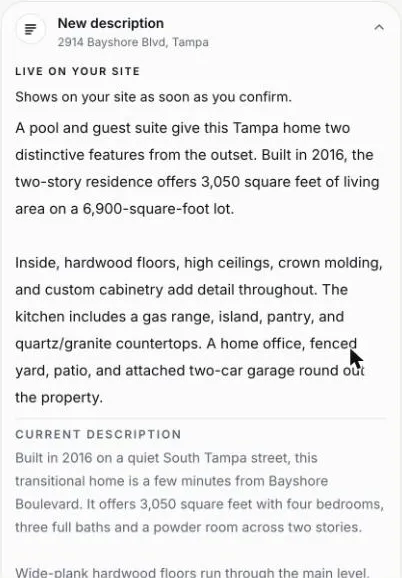
If you would like this done for you, we can do it. AI listing descriptions are part of every HouseListr plan. Bring one of your own addresses to a demo and watch it get written.
Common Questions About AI for Real Estate Listings
Can AI Write a Listing Description?
Yes. An AI real estate listing description is a first draft. Give the AI the home's facts and clear rules, and you can publish that draft after your checks. Give it one line, and you get a form with blanks.
Is AI for Realtors Hard to Learn?
No. If you can copy and paste, you can use every prompt in this guide. The skill is not technical. It is knowing what is true about the home, which you already do.
What Is the Best AI for Real Estate Listings?
For a single description, any of the large chat tools does well with Prompt 1. For every listing you take, a writer that reads your listing and checks its own numbers saves the typing and the checking. We compare the general tools in the best AI tools for real estate agents.
Is There a Free AI Listing Description Generator?
Yes. ChatGPT, Claude and Gemini all have free plans that can run the prompts in this guide. They cannot see your listing, so supplying the facts and checking the result is your part.
Do I Have to Say That AI Wrote My Listing Description?
The NAR guidance we read asks for labels on images and video: "assume that any materially altered or AI-generated media needs a label." It does not ask for a label on text. Your MLS or state may have its own rule, so check. For photos, see who owns your listing photos.
How We Wrote This
We ran three conversations in Claude on November 15, 2026. The pictures reproduce its replies word for word in our own layout, with our highlights added, and the home is invented for the example. We did not rerun them in ChatGPT or Gemini. The prompts are not tied to one tool. OpenAI's guide for ChatGPT asks for prompts that are clear and specific. Anthropic's guide recommends giving examples and asking the AI to check its own work. This guide is information for agents, not legal advice.
- NAR: Faster, Cheaper, Riskier? What Brokers Should Know Before Putting AI to Work, October 23, 2026
- NAR: 2026 Code of Ethics and Standards of Practice, Article 12
- Fair Housing Act, 42 U.S.C. 3604(c), Cornell Legal Information Institute
- OpenAI Help Center: Prompt engineering best practices for ChatGPT
- Anthropic: Prompting best practices